Fancy Text Generator
Preview Unicode text styles, compare supported characters, and copy your result. Explore simple styles, playful effects, and clear compatibility notes.
Loading…
Style previews
Loading…
Bold
Bold version of your text.
Italic
Italic version of your text.
Bold Italic
Bold Italic version of your text.
Sans Serif
Sans Serif version of your text.
Sans Bold
Sans Bold version of your text.
Sans Italic
Sans Italic version of your text.
Sans Bold Italic
Sans Bold Italic version of your text.
Monospace
Monospace version of your text.
Italic Wave
Italic Wave version of your text.
Bold Frame
Bold Frame version of your text.
Star Bold
Star Bold version of your text.
Cursive
Cursive version of your text.
Bold Cursive
Bold Cursive version of your text.
Flourish
Flourish version of your text.
Script Spark
Script Spark version of your text.
Gothic
Gothic version of your text.
Bold Gothic
Bold Gothic version of your text.
Ruled Gothic
Ruled Gothic version of your text.
Double-struck
Double-struck version of your text.
Bubble
Bubble version of your text.
Black Bubble
Black Bubble version of your text.
Bubble Mix
Bubble Mix version of your text.
Square
Square version of your text.
Black Square
Black Square version of your text.
Parentheses
Parentheses version of your text.
Brackets
Brackets version of your text.
Wide
Wide version of your text.
Vapor Dots
Vapor Dots version of your text.
Tiny
Tiny version of your text.
Capitals converted to lowercase
Staircase
Staircase version of your text.
Capitals converted to lowercase
Superscript
Superscript version of your text.
Capitals converted to lowercase
Raised Line
Raised Line version of your text.
Capitals converted to lowercase
Underline
Underline version of your text.
Double Underline
Double Underline version of your text.
Wavy
Wavy version of your text.
Overline
Overline version of your text.
Frame
Frame version of your text.
Strikethrough
Strikethrough version of your text.
Slash
Slash version of your text.
Weird Mix
Weird Mix version of your text.
Hearts
Hearts version of your text.
Arrows
Arrows version of your text.
Leet
Leet version of your text.
Zalgo
Zalgo version of your text.
Glitch
Glitch version of your text.
Upside Down
Upside Down version of your text.
1 characters unchanged
Capitals converted to lowercase
Mirror
Mirror version of your text.
5 characters unchanged
How to use
Four steps. Your original line stays in the box. Copy always reads from the card.
1. Type your text
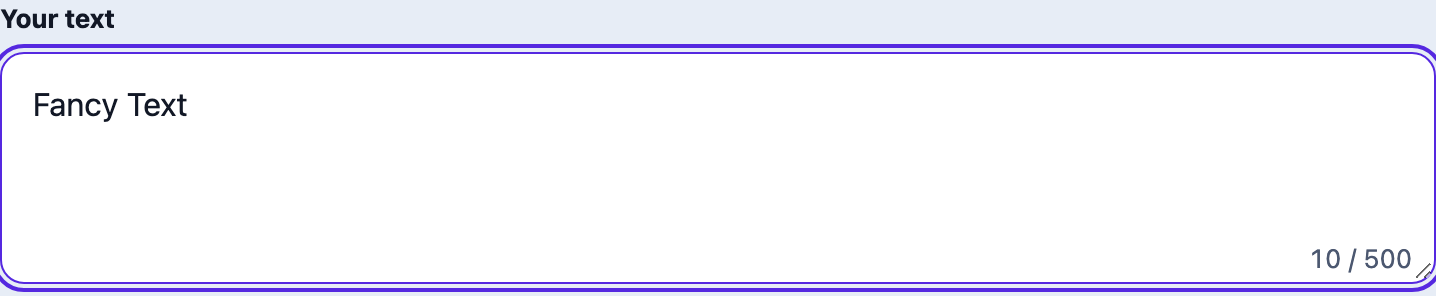
The field is labeled “Your text”. Paste a name or a short line. The page does not focus the field on load, so a phone keyboard stays closed until you tap it. Nothing you type is uploaded or written into the page address.
2. Compare the cards
Each card is one style of the same line. The preview is the text Copy will use. A grey Example badge means the box is still empty and the card is showing the sample Fancy Text; that sample cannot be copied. A note such as “characters unchanged” means those letters had no matching form.

3. Copy
Use Copy, or tap the preview. Copied means the styled line is on your clipboard. It does not mean the next app will keep it. If the clipboard is blocked, the card shows the full line so you can select it yourself.

4. Paste, then look again
Paste into the display name, bio, or message, then open it on the phone other people will use. If you see boxes, or the style disappears, come back and copy a simpler card. Leave the login name in ordinary letters.
FAQ
Can I use this in a WhatsApp name?
The phone number and the name people see are different. This site has no recorded test on WhatsApp, so we do not claim the display name or About line will keep a style. Paste a short sample into the name or About. If the app refuses the paste, deletes the style, or shows boxes, switch back to ordinary letters. Styles built from stacked marks — Zalgo, underline, strikethrough — are the first to go. Keep the plain name in your notes.
Can I use this in an Instagram name or bio?
The @username accepts letters, numbers, periods, and underscores. A styled line will not become that ID. The name and the bio are where a short styled line is sometimes stored. Search uses the @username, not the styled letters, so leave the name in ordinary letters if you want to be found. Instagram is not marked tested here. After you paste, open the profile on a second phone. Boxes on that phone mean its font has no picture for those characters.
Why does the text turn into boxes?
A box means the characters arrived and that device’s font has no glyph for them. The generator did not turn the line back into plain letters. The preview uses fonts already on your device, so it can look right here and fail after you paste. A missing word, rather than a box, means the other app deleted the characters. Publish the plain line in either case.
Which styles are the most compatible?
There is no supported-apps chart. Until a device pass is recorded, every outside app stays Unknown on the compatibility page. Prefer a style that swaps each letter for one character and still looks like a letter: bubble circles, fullwidth vaporwave, or a simple sans or bold card. Then check it on the phone that will display it. Leave Zalgo, heavy underlines, strikethrough, upside-down, and mirror for a chat where a glitch is the point. Those rely on stacked marks or rare look-alikes.
Will people still find my name in search?
Styled letters are different characters from the ones you typed. A search for the plain name will not match the gothic or italic version. Put the real name in ordinary letters, and use a style on a short bio line only.
Do I need to install a font?
No. Nothing is installed. The result is Unicode text, and the app you paste into decides whether it can draw those characters. FancyTextHub does not ship a font to hide missing glyphs.
Why did some letters stay plain?
Unicode has no styled form for every character. Italic styles have no digits. Some gothic capitals stay Latin. Upside-down and mirror skip letters with no look-alike. The card states how many characters stayed unchanged. That is the table, not a failed copy.
The style disappeared after I pasted. What now?
Copy from the card again, not from the input. The input stays plain on purpose. If a second paste is still plain, that app removed the characters. Pick a simpler card, or send the plain sentence. Copied only means the clipboard has the styled line.
Styled output depends on the app that receives your paste. Read thecompatibility page for how we label tested versus unknown targets.